


Pricing
Your calls, handled.
Your day, back.
One flat price a month, from $10/mo. Kai answers the calls you can't, takes the details and texts them to you.

Choose your plan.
Have a code?
Your code is checked in secure checkout. Any eligible offer replaces the start offer.
Kai Backup
Missed Call Rescue: $2 to start
Forward missed calls from your mobile phone to Kai.
Included each month
- ~20 Kai-answered calls
- 48 call minutes
- Up to 20 texts sent a day
- 1 KaiCalls phone number
- Meeting notes: first 60 minutes free, once
- No per-minute overage
$2 for your first week, then $10/mo. Cancel anytime. Intro offer for eligible new subscribers.
Plan details
- Texting registration: $49 once + $15/mo add-on; carrier approval required
- Texts customers send you don’t count toward the daily limit
- Extra lines are $15/mo each
Kai Line
The Never-Miss-a-Job Line
Set up answering for your business number and manage calls on mobile or the web.
Included each month
- ~170 Kai-answered calls
- 408 call minutes
- Up to 50 texts sent a day
- 1 KaiCalls phone number
- 1 hour of meeting notes
- No per-minute overage
$2 for your first week, then $79/mo. Cancel anytime. Intro offer for eligible new subscribers.
Plan details
- Texting registration: Included with an active paid subscription (not during trial); carrier approval required
- Texts customers send you don’t count toward the daily limit
- Extra lines are $15/mo each
Kai Office
Set up 3 office phone lines and connect your desk phones.
Included each month
- ~800 Kai-answered calls
- 1,920 call minutes
- Up to 100 texts sent a day
- 1 KaiCalls phone number + 3 office lines
- 10 hours of meeting notes
- No per-minute overage
$2 for your first week, then $349/mo. Cancel anytime. Intro offer for eligible new subscribers.
Plan details
- Office phone connections; hardware sold separately
- Texting registration: Included with an active paid subscription (not during trial); carrier approval required
- Texts customers send you don’t count toward the daily limit
- Extra office lines are $29/mo each
Every plan includes
- Kai answers when you can’t, day or night
- Voicemails written out and sent to you
- Kai can call customers back for you
- Books appointments on your connected calendar
- Answers in English, Spanish and more
- Email campaigns from your own domain
- Kai takes notes in your Zoom, Google Meet and Teams calls
- Texting on your business number once it’s approved
- Spam calls Kai screens out don’t count toward your calls
- Unlimited team members, no seat fees
What a plan did for one shop: Ken Rent, a tent and party rental business in New Jersey.
- in orders from Kai callers
- $443K
- in orders from Kai callers
- orders
- 269
- orders
- first-time customers
- 129
- first-time customers
- calls Kai answered
- 3,185
- calls Kai answered
Everything in Kai Line
The call is just the start.
One secretary for the customer work around your business: answer the call, follow up, reach your customer list and keep the meeting notes. Start with the job you need help with; connect the other services when you are ready.
The software features are available across plans. Choose the call allowance, phone lines and meeting allowance that fit your business. Connected services have their own setup requirements; physical phones are separate.
The Never-Miss-a-Job LineKai Line: $79/mo$2 for your first week, then $79/mo. Cancel anytime.
Introductory offer for eligible first-time subscribers; cannot be combined with another discount. Secure checkout confirms your total.
What Kai can take off your plate
The phone rings while your hands are full.
Kai answers, captures what the caller needs and saves a summary for you to act on.
An active phone plan, an assigned number and your answering instructions.
Explore 24/7 AI call answering and intakeYou have availability and customers to reach.
Prepare an email campaign from your business domain, review the audience and message, then approve its launch.
A verified sending domain, account approval and an eligible audience.
Explore Email campaigns from your business domainThe conversation needs a next step.
Set up email, texts or callbacks using the customer history, timing and instructions you choose.
Connected senders and customer consent where required; texting needs carrier approval.
Explore Automated follow-upThe meeting ends. The details still matter.
Invite Kai to a supported meeting, then review the summary and share the next steps.
Meeting access and admission when required. Included minutes and add-ons vary by plan.
Explore Meeting assistant and notes
Included in your starting plan
- A business number. Your cell rings first, and Kai answers the rest: ~170 Kai-answered calls/mo, no per-call charges.
- Kai texts your callers from your business number after carrier approval.
- Texting registration is included with an active paid subscription after any trial; carrier approval is required.
- Email from your own domain after sender verification and account approval, with replies in the same inbox.
- Email campaigns for your eligible customer list: review the sender, audience and message before approving launch.
- Outbound calls and callbacks with a goal, an assigned agent and the contacts you are allowed to reach.
- Booking through your connected calendar, with your availability and rules.
- Kai joins your Zoom, Google Meet or Teams calls and emails you the notes: an hour a month.
- Kai speaks English and Spanish, and follows the caller.
See the actual product before you choose
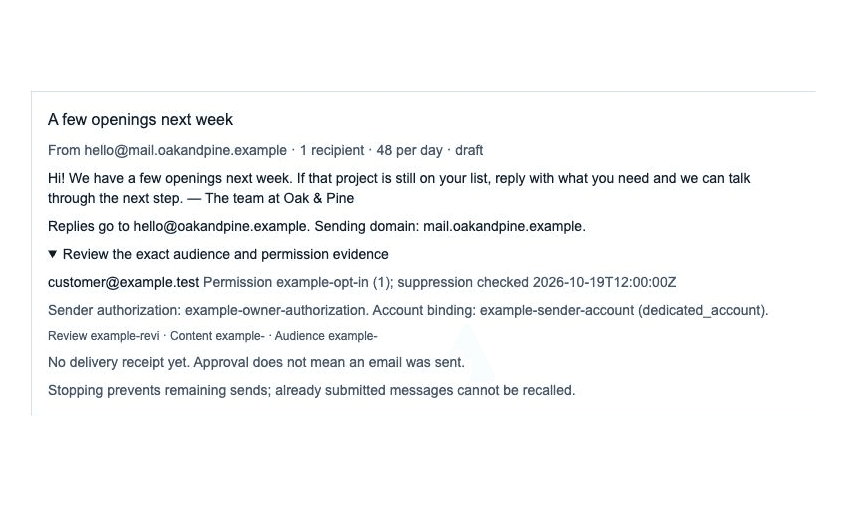
For calls, watch the product turn a conversation into a saved lead.
Explore calls, campaigns, follow-up and meetings- Every paid plan includes a 30-day money-back guarantee.
- Your price stays the same for as long as you stay.
- Plans without monthly meeting minutes get 60 minutes once. Plans with monthly minutes use their included allowance.
Before you activate
Can I keep my current business number?
Yes. You can forward calls from your existing number to Kai, or give customers your new Kai number. Forwarding is optional and depends on your carrier. Paying does not change your existing number or turn forwarding on.
What happens after I pay?
Payment starts your plan. Finish number setup and any required verification, then make a private test call before connecting customer calls. Number availability and verification still apply. Texting needs separate carrier approval.
What if Kai is not right for my business?
Every paid plan includes a 30-day money-back guarantee. You can cancel your subscription in billing. Turning off call forwarding with your carrier is a separate step.
Hear Kai handle calls for your industry
Hear Kai answer a call for a business like yours.
Choose a business similar to yours to see what Kai handles. Then call the demo line from your phone to hear the greeting, ask a question, and try leaving a callback request.
HVAC
Kai for HVAC
Peak-season overflow, no-heat emergencies, maintenance scheduling
One demo line for every industry. Ask a question or leave a test message.

Live in minutes.
Keep your number.
Rather talk it through first? Call Kai now and ask how setup works.
Tell Kai about your business.
Create your account. Add your website if you like, and Kai reads your services and hours from it.
Get your new number.
We pick a number for you. Want a different area code? Swap it. Your first week is $2.
Call it. Then forward your line.
Hear Kai answer on your new number first. Then forward only the calls you don’t pick up: your phone rings first, Kai takes the rest. Your number and your carrier stay the same.
Step-by-step forwarding for
- Verizon
- AT&T
- T-Mobile
- Mint Mobile
- Metro by T-Mobile
- Xfinity Mobile
- Other carriers and landlines
Your line runs on
- Phone networks
- Twilio


- Speech and language
- OpenAIAnthropic


Why it costs less than an answering service
No call center
There's no room full of operators to pay for. That cost never lands on your bill.
Kai answers every call
Day or night, Kai picks up, takes the details, and gets them to you.
No per-minute charges
Kai Line is $79 a month, flat. A long call costs the same as a short one.
Estimate the value of missed calls
Estimate the value of missed calls
Move the sliders to match your business.
What missed calls could be worth a year
$60,000
$5,000 a month from 10 missed calls at $500 each.
Kai Line costs
$948a year
$79/mo, ~170 Kai-answered calls/mo.
This estimate assumes each missed call becomes a customer. Actual results depend on how many callers buy and the value of those sales. Optional services and taxes are excluded from the plan cost shown.
Win back 2 missed calls a year and Kai Line pays for itself.
Compare plansCompare plans row by row
Compare plans
Every plan, row by row
Compare call allowances, phone resources, texting registration and meeting minutes. Core software is available on every plan. Messaging and connected services need setup and approval before use.
What changes between plans
- Monthly priceFlat. Billed month to month.
- $79/mo
- Kai-answered calls includedFair-use allowance per month.
- ~170 Kai-answered calls/mo
- Call minutes includedMinutes Kai spends on calls each month.
- 408 call minutes
- Texts you can sendPer day, after texting approval. Texts customers send you are not counted.
- Up to 50 texts sent a day
- Effective rate
- $0.46/Kai-answered call
- Business texting registrationTexts start after carrier approval. Add-on fees are confirmed before checkout.
- Included with an active paid subscription (not during trial); carrier approval required
- Meeting-note allowanceMonthly minutes and the one-time free allowance are separate; extra hours cost extra.
- 1 hour/month
- Per-minute overageWhat you pay when a call runs long.
- None
- Move plans when volume changesWe tell you before a move, and you can decline it.
- Included
- Live phone activation
- Starts after payment
- Contract and setup fee
- None. Cancel anytime.
Phone lines and hardware
- KaiCalls phone numbers included
- 1
- Office (desk phone) lines included
- Not included
- Add another line
- $15/mo each
- Add a desk phone connectionHandsets are sold separately.
- $29/mo per handset
- Teammate cell phones on the ring groupNo seat charge for a cell phone that rings.
- Unlimited
Optional services, additional phone resources, and applicable telecom taxes and fees are billed separately. Ask us about your setup
Features and setup
Everything Kai can do
Answer calls, follow up with customers, and connect the tools your team uses. Open a feature for its setup instructions and requirements. DNI is an optional paid service; the other software features below are included on every plan.
Explore all features and setup
Calls and routing
Software included
24/7 AI call answering and intake
Answers inbound calls, captures caller details, qualifies leads, and creates an organized call summary.
Details and setupSoftware included
Multilingual voice answering
Configure up to four languages per line from English, Spanish, French, German, Portuguese, Italian, Dutch, Hindi, Japanese, and Russian. Kai follows the caller's language and switches without a phone menu.
Details and setupSoftware included
Team routing and live call transfer
Ring team members first, screen callers, introduce the caller, or transfer immediately to the people and numbers you choose.
Details and setupSoftware included
Call recordings and transcripts
Review available recordings, searchable transcripts, summaries, and call details in the dashboard and API when recording is enabled.
Details and setupSoftware included
Voicemail capture and transcription
Capture unanswered messages, transcribe them, and keep them with the caller's conversation history.
Details and setupFollow-up and scheduling
Software included
Email campaigns from your business domain
Prepare a campaign for a consented audience, review the exact content and recipients, then launch within your sender allowance. Incoming replies appear in customer history. Requires managed sender setup and campaign readiness.
Details and setupSoftware included
Text campaigns and message sequences
Review an eligible text audience and message sequence, manage paced sending, and inspect recipient outcomes. Configured replies can stop a sequence. Texting registration and contact permission are required.
Details and setupSoftware included
Unified SMS, WhatsApp and email workspace
Review SMS, WhatsApp and connected email threads in Messages, reply with customer context, and take over from Kai. Each channel requires its own sender setup.
Details and setupTurns on once your number is approved
Two-way SMS and WhatsApp conversations
Continue customer conversations by text or WhatsApp using the same business context, history, and messaging rules for each number.
Details and setupSoftware included
Automated follow-up
Run automated SMS, email, callback, missed-call, and post-call follow-up with timing, retry, quiet-hour, and safety settings.
Details and setupSoftware included
AI-assisted email drafting and sending
Draft from lead and call details, review when required, and send through a connected email account.
Details and setupSoftware included
Calendar availability and appointment booking
Check live availability and book through a connected Google Calendar or GoHighLevel calendar. Rescheduling and cancellation require Google Calendar.
Details and setupSoftware included
Outbound calls and callback campaigns
Schedule callbacks and outbound calls, then track their status, retries, and campaign settings.
Details and setupSoftware included
Meeting assistant and notes
Send Kai a supported Zoom or Google Meet link to join, take notes, answer when addressed and save a summary. Host admission, plan allowances and optional on-camera add-ons apply.
Details and setupIntegrations and control
Software included
Customer and field-service integrations
Connect supported business tools and send lead and call details automatically.
Details and setupSoftware included
Signed webhooks, Zapier, Make, and REST API
Connect calls, leads, appointments, outbound actions, and follow-up requests to Zapier, Make, or your own software.
Details and setupSoftware included
Kai business assistant and MCP access
Use Kai in the dashboard or connect approved AI assistants to calls, leads, messages, analytics, and controlled AI assistant changes.
Details and setupOptional paid service
Dynamic number insertion and marketing attribution
Optional website call tracking that shows which page, ad, campaign, UTM, or click produced each inbound call.
How call tracking worksSoftware included
Call analytics, outcomes, and coaching
Track call outcomes, lead quality, summaries, quality signals, and coaching context from completed conversations.
Details and setupYour team and business phone
Add unlimited team members without seat fees. Create multiple secretaries with your business instructions and voice settings. Use the dashboard softphone to make and receive calls, and review calls, texts, and voicemail in the Activity Feed.
Set up your phone and routingConnect your existing accounts
Supported tools include Google Calendar, GoHighLevel, HubSpot, Salesforce, ServiceTitan, Jobber, and Housecall Pro. Connect your account and configure the fields and actions you need. Available actions vary by integration. SMS and WhatsApp each need their own sender setup. Your connected services may charge separately.
View integrationsOptional services and additional phone resources
Optional paid service
Dynamic number insertion (DNI)
Show website visitors a tracking number and match their calls to the source, landing page, ad campaign, UTM parameters, and available click data. Attribution appears on matched call records, so you can see which marketing produces calls.
From $50/mo on any plan. Setup needs a pool of tracking numbers and a script on your website. The pool needs enough numbers for the visitors you get at once, so the price grows with the pool.
Extra numbers and office phones
Your plan includes the phone resources shown above. Extra lines are $15/mo each on Kai Backup and Kai Line. Extra office lines are $29/mo each on Kai Office.
Hardware is sold separately. Contact us for compatible phones and delivery details. Team members using their cell phones do not add a desk-phone connection charge.
Applicable telecom taxes and regulatory fees appear separately on your invoice.
Discuss your phone setupTexting registration and meeting notes
Texting registration coverage and any filing and monthly fees are shown on each plan above. Included registration starts after any trial, with an active paid subscription. Texting starts after carrier approval; email campaigns require a verified sender, recipient permission and account approval. Calendar booking needs a connected calendar.
Meeting notes use the allowance shown for your plan. Plans without monthly minutes get a one-time free allowance. Extra meeting time is $29/mo for 10 additional hours a month on any plan.
Flat monthly pricing. No per-minute overage.
Your plan has a fixed monthly price. Optional services, additional phone resources, and applicable telecom taxes and fees are separate.
- •No per-minute overage charges
- •Unlimited team members without user seat fees
- •No setup fees and no annual contract required
- •Extra lines from $15/mo each
Pricing and billing
Common Billing Questions
Explore every capability and its setup requirements
Not ready to buy anything? Read the free book on missed calls. The fixes that cost nothing come first.